
















Обзор
C-PLUG
Особенности

C-PLUG:
- Fast and easy replacement of SIMATIC NET components without reconfiguration of the spare part.
- Device replacement without the need for specially trained personnel, programming devices or PCs
- Downtimes of network segments and connected Industrial Ethernet nodes are minimized if a fault occurs.
- Automatic backup of configuration and project engineering data for SIMATIC NET components
- The C-PLUG can also be used to store application data such as documentation or web pages
Область применения
C-PLUG:
The C-PLUG is used if the replacement of network components or communication modules needs to be quick and simple when a fault occurs, without having to configure the replacement and without the need for specialist personnel. It can be used in all SIMATIC NET products with a C-PLUG slot.
Дизайн
C-PLUG:
The C-PLUG is offered in two designs:
- C-PLUG with IP20 degree of protection
- C-PLUG with IP20 degree of protection and with conformal coating for use in harsh environments.
Degree of protection for IP65/67 components is ensured by the design of the target device. The power supply is also provided by the terminal device.
The C-PLUG is inserted in the designated slot of the SIMATIC NET component. The configuration data are automatically saved to the C-PLUG during device start-up and reconfiguring. If a device needs to be replaced, the C-PLUG is simply removed from the failed component and plugged into the replacement device. The replacement device installed in the network or automation system now starts up automatically with the same device configuration as the failed device.
To prevent unintentional removal or falling out, the C-PLUG slot is usually located on the rear of the devices.
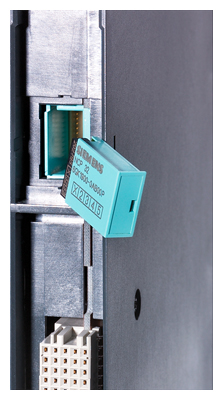
Plugging the C-PLUG into the rear of the CP 443-1 Advanced
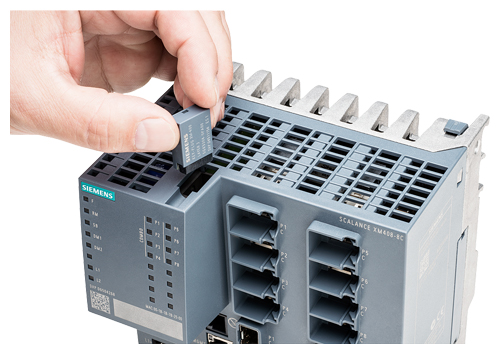
Plugging the C-PLUG into the SCALANCE XM408-8C switch
Функции
C-PLUG:
During start-up, the device automatically backs up the configuration data on an unwritten C-PLUG (delivery state) that has been plugged into a SIMATIC NET component. Changes to the configuration during operation are also saved on the C-PLUG without any additional operator intervention being necessary. During startup, an unconfigured device automatically loads the configuration data from an inserted, written C-PLUG, provided the data were written by a compatible device type.
Diagnostics
Incorrect use of the C-PLUG, such as inserting a C-PLUG containing the configuration of a different device group or general malfunctions of the C-PLUG, are indicated by diagnostics mechanisms of the respective terminal device (LEDs, PROFINET, SNMP, web-based management, etc.).
The following devices of the named product lines have a C-PLUG slot:
Product line |
C-PLUG 6GK1900-0AB00 |
C-PLUG 6GK1900-0AB10 |
|---|---|---|
SCALANCE X Industrial Ethernet switches |
SCALANCE X-200 |
SCALANCE XC-200, SCALANCE XP-200 |
‑ |
SCALANCE XF-200 BA |
|
‑ |
SCALANCE XF-200BA DNA |
|
SCALANCE X-300 (included in scope of delivery) |
‑ |
|
SCALANCE X-400 (included in scope of delivery) |
SCALANCE XM-400 (included in scope of delivery) |
|
‑ |
SCALANCE XR-500 (included in scope of delivery) |
|
SCALANCE S Security Modules |
SCALANCE S-600 |
SCALANCE S-615 |
‑ |
SCALANCE SC-600 |
|
Industrial Wireless LAN SCALANCE W |
‑ |
W78x, W77x IWLAN access points |
‑ |
IWLAN client modules W74x, W73x |
|
SCALANCE M industrial modems and routers |
‑ |
SCALANCE M81x |
‑ |
SCALANCE M826 |
|
‑ |
SCALANCE M87x |
|
System connections for SIMATIC S7 |
CP 443-1 Advanced (included in scope of delivery) |
‑ |
CP 343-1 Advanced (included in scope of delivery) |
‑ |
|
CP 343-1 ERPC (included in scope of delivery) |
‑ |
|
Gateways |
IE/PB LINK PN IO |
‑ |
IE/AS-i LINK PN IO |
‑ |
|
DP/AS-i LINK Advanced |
‑ |
Note:
For all SIMATIC NET components that are designed for more severe environmental conditions (e.g. SCALANCE XP-200EEC), the C-PLUG conformal coating (6GK1900-0AQ10) is also suitable.
Технические данные
Article No. |
6GK1900-0AB10 |
6GK1900-0AQ10 |
|---|---|---|
Supply voltage |
Via terminal device |
Via terminal device |
Power loss |
0.015 mW |
0.015 mW |
Installation |
Can be plugged into C-PLUG slot |
Can be plugged into C-PLUG slot |
Constructional design |
||
|
24.3 x 17 x 8.1 |
24.3 x 17 x 8.1 |
|
Approx. 5 g |
Approx. 5 g |
Memory capacity |
256 MB |
256 MB |
Degree of protection |
IP20 |
IP20 |
Дальнейшая информация
Selection Tool:
The TIA Selection Tool supports the selection of corresponding network components and software and is available at:
www.siemens.com/tst